Score from your wrist
Tap YOU or OPP to give the point. Undo is one tap away, and Double Tap on newer watches awards you the point without touching the screen.
Love-40 scores your match with a tap on your wrist while a real Tennis workout records your heart rate and calories. Afterwards your iPhone turns every point into stats, rivalries and the odd well-earned award.
£3.99, once. No subscription, no ads. For Apple Watch (watchOS 10 or later) paired with an iPhone (iOS 17 or later).
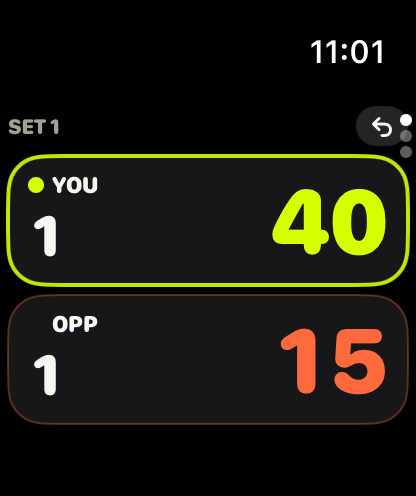
Built for real matches on real courts: big targets you can hit between points, the proper rules, and a summary that's worth reading afterwards.
Tap YOU or OPP to give the point. Undo is one tap away, and Double Tap on newer watches awards you the point without touching the screen.
Best of 1, 3 or 5. Advantage or no-ad, tie-breaks to 7 or 10, match tie-breaks, serve rotation and change of ends, singles or doubles.
Every match runs as a Tennis workout in Apple Health, with heart rate, active calories, steps and distance. Indoor courts are saved as indoor tennis.
A different tap for a point, game, set, match and change of ends, and a double tap when it's your serve. Keep your eyes on the ball.
Name your opponents and doubles partners. Each rival gets a full head-to-head: record, form, tie-breaks, biggest win and their favourite excuse.
Record, form, streaks, serve and return, break points, tie-breaks, deciding sets and comebacks, filtered by 30 days, 90 days, a year or all time.
The conditions for the hours you played and the nearest club are filled in for you. Find out whether you really do play better when it's mild and calm.
Switch sport and Love-40 goes doubles with golden point on astro, adds "The glass" to the excuses, and talks padel in the commentary.
Share a result card, export your matches to CSV, and keep an automatic backup in the Files app that you can restore at any time.
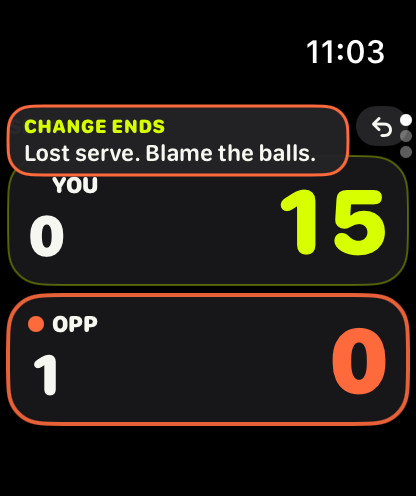
At the big moments — break points, set points, a run of three in a row — Love-40 shows a short line on the watch. Pick a personality, or switch it off and just keep score.

Match won. Enjoy that one.
Encouraging, to the point.
You won. Shake hands. Don't gloat. Much.
Cheeky British sarcasm.
Great win. Next time, win it quicker.
A partner who can't play, full of useless tips.
Match won. Knee was at about 60 percent.
Always has one ready.
Match won. Somewhere, a pigeon applauds.
Your park match, as a Centre Court final.
…
Just the score. We understand.
Long-press the opponent's score to log an excuse: wind, sun, net cord, line call, racket, bad bounce, shoes, injury, partner. Afterwards your iPhone compares each one against the court and the actual weather, and rules on it.
Hot Air — blamed weather that wasn't there.
While you play, a LIVE card sits at the top of the iPhone app. It opens a full scoreboard with momentum, head-to-head, heart rate, calories and steps, updated after every point.
Love-40 has no accounts, no ads, no analytics and no servers of its own. Your data lives on your watch and iPhone.
Nothing to sign up for. Open the app and play.
No ads, no analytics, no third-party SDKs.
Matches sync between your own watch and iPhone only.
Health access is optional, and you can export or delete everything.
£3.99, paid once on the App Store (or the equivalent in your country). That one purchase gets you both the Apple Watch and iPhone apps. There's no subscription, no in-app purchases and no ads.
An Apple Watch on watchOS 10 or later, paired with an iPhone on iOS 17 or later. Scoring happens on the watch; the iPhone app is where you see your history, stats and live scoreboard. Double Tap scoring needs Apple Watch Series 9 or Ultra 2 with watchOS 11.
Yes. The watch scores and records the workout on its own. Finished matches sync to your iPhone the next time they're in range.
Yes. At the start of each set the watch asks each team who serves first, then tracks who's serving every game and tie-break point. Stats show service games held per player and per partner.
No. Without Health access the scoring works exactly the same; you just won't get heart rate, calories, steps or a workout saved to Health.
Tap the undo arrow at the top of the score screen. You can undo as far back as you like, and the serve, ends and stats all follow.
Yes. The iPhone app keeps an automatic backup in the Files app (On My iPhone › Love-40), and you can export a backup to iCloud Drive or anywhere else from Defaults › Backup. Restoring only adds what's missing, so it never overwrites your history.
Something else? Visit support.

Love-40 is coming soon to the App Store for Apple Watch and iPhone: £3.99, once.
Get in touch